
Source: Tinko Group Website
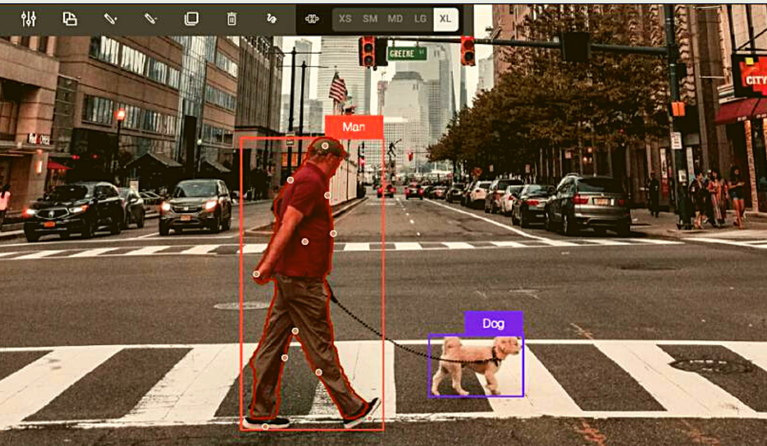
Have you ever wondered how computers can identify and locate objects in images? Object detection is one of the most challenging tasks in computer vision, requiring sophisticated pattern recognition capabilities. In this comprehensive guide, we’ll build a complete object detection system from scratch using PyTorch, covering everything from data preparation to model training and validation.
What You’ll Learn
- How to preprocess and prepare object detection datasets
- Building a multi-task neural network architecture
- Implementing classification and regression heads
- Training strategies for object detection models
- Evaluating model performance and interpreting results
Understanding Object Detection
Object detection combines two fundamental computer vision tasks:
- Classification: Identifying what objects are present in an image
- Localization: Determining where these objects are located using bounding boxes
Unlike image classification, which assigns a single label to an entire image, object detection must handle multiple objects of different types and sizes within the same image. This complexity makes it one of the most challenging problems in computer vision.
Dataset Selection and Loading
For this tutorial, we’ll use the Fashionpedia dataset from Hugging Face, which contains fashion images with detailed annotations. This dataset is ideal for learning object detection because it includes:
- High-quality fashion images
- Precise bounding box annotations
- Multiple object categories (clothing items, accessories)
- Consistent image dimensions
Let’s load the dataset and examine its structure:
from datasets import load_dataset

dataset = load_dataset("detection-datasets/fashionpedia")
category_labels = ['shirt, blouse', 'top, t-shirt, sweatshirt', 'sweater', 'cardigan', 'jacket', 'vest', 'pants', 'shorts', 'skirt', 'coat', 'dress', 'jumpsuit', 'cape', 'glasses', 'hat', 'headband, head covering, hair accessory', 'tie', 'glove', 'watch', 'belt', 'leg warmer', 'tights, stockings', 'sock', 'shoe', 'bag, wallet', 'scarf', 'umbrella', 'hood', 'collar', 'lapel', 'epaulette', 'sleeve', 'pocket', 'neckline', 'buckle', 'zipper', 'applique', 'bead', 'bow', 'flower', 'fringe', 'ribbon', 'rivet', 'ruffle', 'sequin', 'tassel']Data Preprocessing and Preparation
The Fashionpedia dataset contains images of varying sizes and multiple objects per image. To optimize training efficiency and ensure consistent model input, we need to:
- Filter images to a consistent height (1024 pixels)
- Pad images to a fixed width (712 pixels)
- Resize images to reduce computational load
- Limit objects per image to the first 5 for simplicity
This preprocessing approach balances computational efficiency with model performance. Here’s our key preprocessing function:
def transform_inputs(examples):
    images, bboxes, categories = [], [], []
    for image, objects in zip(examples['image'], examples['objects']):
        width = image.size[0]
        if width < 712:
            padding_right = (712 - width)
            image = ImageOps.expand(image, (0, 0, padding_right, 0), fill=0)

        image = image.resize((712//4, 1024//4), Image.Resampling.LANCZOS)
        image = np.array(image.convert("RGB"))
        images.append(torch.tensor(image).permute(2, 0, 1))

        # For simplicity's sake, we'll only look at the first 5 objects
        bboxes.append([[item[0]//4, item[1]//4, item[2]//4, item[3]//4]
                      for item in objects['bbox'][0:5]])
        categories.append(objects['category'][0:5])
return {'image': images, 'bbox': bboxes, 'category': categories}Building the Neural Network Architecture
Our object detection model uses a multi-task learning approach, combining two specialized components:
- Feature Extractor: Convolutional layers that learn visual patterns
- Classification Head: Predicts object categories
- Regression Head: Predicts bounding box coordinates
This architecture allows the model to simultaneously learn what objects are present and where they’re located. The shared feature extractor ensures efficient learning by leveraging common visual patterns.

Source: AIML.com Research
Here’s our core model implementation:
class MultiTaskModel(nn.Module):
    def __init__(self, input_size, num_classes):
        super(MultiTaskModel, self).__init__()
        self.feature_extractor = FeatureExtractor()
        self.model_adaptor = ModelAdaptor(64 * 32 * 22)
        self.classifier_head = ClassifierHead(64, num_classes)
        self.regressor_head = RegressorHead(64)

    def forward(self, x):
        x = self.feature_extractor(x)
        x = self.model_adaptor(x)
        class_output = self.classifier_head(x)
        bbox_output = self.regressor_head(x)
return class_output, bbox_outputTraining the Model
Training an object detection model requires careful consideration of several factors:
- Loss Functions: We use CrossEntropyLoss for classification and MSELoss for regression
- Optimization: Adam optimizer with learning rate 0.001
- Training Duration: 20 epochs (adjustable based on performance)
- Device Selection: Automatic GPU detection for faster training
The training process combines both classification and regression losses, allowing the model to learn both tasks simultaneously. Here’s our training implementation:
# Training setup
device = torch.device('cuda' if torch.cuda.is_available() else 'cpu')
model = MultiTaskModel(input_size=(3, 256, 178), num_classes=num_classes).to(device)

classification_loss = nn.CrossEntropyLoss(ignore_index=-1)
regression_loss = nn.MSELoss()
optimizer = optim.Adam(model.parameters(), lr=0.001)

# Training loop
for epoch in range(num_epochs):
    model.train()
    for images, bboxes, categories in dataloader:
        images, bboxes, categories = images.to(device), bboxes.to(device), categories.to(device)

        class_preds, bbox_preds = model(images)

        # Calculate losses
        class_loss = classification_loss(class_preds.view(-1, num_classes), categories.view(-1))
        bbox_loss = regression_loss(bbox_preds, bboxes)
        total_loss = class_loss + bbox_loss

        # Backpropagation
        optimizer.zero_grad()
        total_loss.backward()
optimizer.step()Evaluating Model Performance
After training, it’s crucial to evaluate how well our model performs on unseen data. Object detection evaluation involves two key metrics:
- Classification Accuracy: How often the model correctly identifies object categories
- Bounding Box Precision: How accurately the model locates objects
Let’s examine our model’s performance on a test image. The ground truth annotations show us what the model should detect:

Source: AIML.com Research
Now let’s see what our trained model predicts:

Source: AIML.com Research
Analysis of Results
Comparing the ground truth and predictions reveals several important insights about our model’s performance:
- Partial Success: The sleeve detection captures the general area but lacks precision
- Classification Challenges: The model mislabels the blouse as a “neckline”
- Occlusion Sensitivity: The bag covering part of the outfit affects detection accuracy
These results highlight common challenges in object detection, particularly when dealing with:
- Occluded or partially hidden objects
- Similar-looking object categories
- Variations in object appearance not seen during training
Future Improvements and Advanced Techniques
While our basic model demonstrates the core concepts of object detection, several advanced techniques can significantly improve performance:
- Data Augmentation: Rotation, scaling, and color jittering to increase dataset diversity
- Non-Maximum Suppression: Post-processing technique to eliminate duplicate detections
- Advanced Architectures: YOLO, R-CNN, and Transformer-based models for better performance
- Feature Pyramid Networks: Multi-scale feature extraction for objects of different sizes
Conclusion
Building an object detection model from scratch provides valuable insights into the fundamental challenges of computer vision. Our implementation demonstrates:
- The complexity of multi-task learning in computer vision
- The importance of proper data preprocessing and augmentation
- How architectural choices impact model performance
- The ongoing challenges in achieving human-level object detection
This foundation serves as a stepping stone toward understanding more sophisticated object detection systems used in real-world applications like autonomous vehicles, medical imaging, and surveillance systems.
Videos
- In this video, “Lecture 15: Object Detection” by Michigan Online, Prof. Justin Johnson introduces object detection talks about various techniques used to localize objects in images. He talks about two-stage R-CNN family of methods for object detection including “slow” R-CNN, Fast R-CNN, and Faster R-CNN, and also briefly discuss single-stage approaches to object detection. (Runtime: 1 hr 12 mins)

- In this video, “Stanford CS231N, Lecture 9: Object Detection, Image Segmentation, Visualizing”, Prof. Ehsan Adeli talks introduces object detection by comparing single-stage and two-stage detectors, and places them in context with image segmentation tasks. Object Detection starts at around 33:14 mins. As such the full video is very interesting to watch through (33:14 – 58 mins, Runtime: ~30 mins)
https://www.youtube.com/watch?v=PTypu6GqEd4
References and Further Reading
- Redmon, J., et al. “You Only Look Once: Unified, Real-Time Object Detection.” CVPR 2016.
- Girshick, R., et al. “Rich feature hierarchies for accurate object detection and semantic segmentation.” CVPR 2014.
- Lin, T.Y., et al. “Feature Pyramid Networks for Object Detection.” CVPR 2017.
- Fashionpedia Dataset: https://huggingface.co/datasets/detection-datasets/fashionpedia